
Coframe Landing Pages guide
How Landing Pages works and how to use it well. Written for Coframe's team and for customers building with it. Coframe builds pages in your brand, measures every one, and helps you keep what works.
- Live today
- On for every customer
- In beta
- On for some workspaces
- Coming soon
- In build, no date promised
Start here
Contents
| Chapter |
|---|
| PrinciplesWhy pages are run like experiments, and what that changes. |
| ConceptsPages, variants, parts, templates, campaigns, measuring and publishing. |
| Getting startedYour first page live: brand, build, domain and publish. |
| For your engineerThe DNS records and setup. About five minutes of their time. |
| Use casesWorked examples, such as a page for every ad. |
| Website buildersHow this differs from building pages in a website builder. |
| ExperimentsLanding pages compared with testing on your own site. |
| FAQShort answers to the questions people ask most. |
| Coming soonWhat is in build. No dates promised. |
Common tasks
Jump straight to the part of the guide that answers it.
How it works
Website builders start with a design and add measurement at the end. Coframe starts with what you know about your visitors and generates the design. The loop closes: results change the pages.
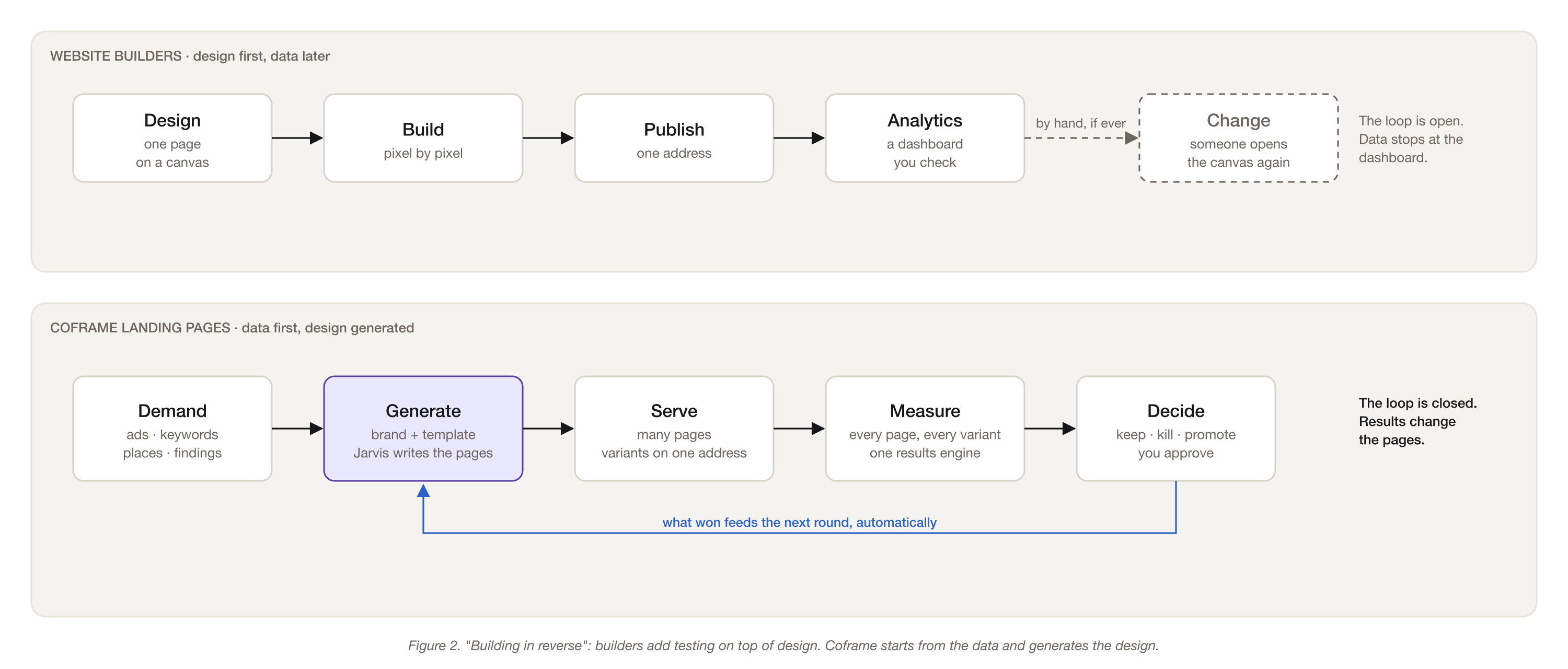
Tap the diagram to open it full size.
Figure 2. Building in reverse. More in Principles.
Before you start
Landing Pages is for marketers, growth and performance teams, and anyone who runs tests. No design or code needed. You do need three things:
- A website. Coframe learns your colors, type and voice from it.
- A goal for the page. A demo, a signup, a call. The thing a visitor should do.
- Visitors to send. From ads, email or social. Results need people.
Getting help
Ask Jarvis. Jarvis, Coframe's assistant, sits beside every page in the editor. Ask it how to do something, or to do it for you. For anything else, check the FAQ or contact your Coframe team.
This guide is built on Coframe Landing Pages, the way it describes.